
The City Nature Challenge (CNC) is a large citizen science event covering cities around the globe. It was first held in 2016 by the California Academy of Sciences and Natural History Museum of Los Angeles County. CNC brings cities from around the world together. Citizens of participating cities record and identify local wildlife with the free app iNaturalist. Data collected during CNC would contribute to the global biodiversity database and assist scientists in ecological research.
Since 2023, OWLHK has been the volunteer city organizer for the City Nature Challenge (Hong Kong Region), helping to promote the City Nature Challenge in Hong Kong. During the period of 24-27 April 2026, the public took photos of wild animals and plants in Hong Kong. Then, in the period of 28 April-10 May, participants uploaded records and identify species. The result was announced on 13 May.
How to Participate
- Go to the iNaturalist website or download the free mobile app (iNaturalist or iNaturalist Classic), and register an account.


- Within the activity period, explore wild animals and plants in the Hong Kong area and take good quality photos.
- Upload the photos of wildlife to iNaturalist and fill in information such as location and date. (Observation records made from 24-27 April will be automatically included in the Hong Kong CNC project.)
- Species identification: wildlife, including native and non-native species in Hong Kong.
- The observation records will be identified by the global iNaturalist community from 28 April to 10 May and the results will be announced on 13 May.
- All are welcome to take part in documenting the biodiversity of Hong Kong!
Notes
- Please do not submit photos of selfies, pets, indoor or outdoor potted plants, as it may affect the authenticity and accuracy of the database.
- Protect and preserve nature, please try to reduce your interference with the environment, animals and plants.
iNaturalist Mobile App User Guideline
2026 Hong Kong Region Result
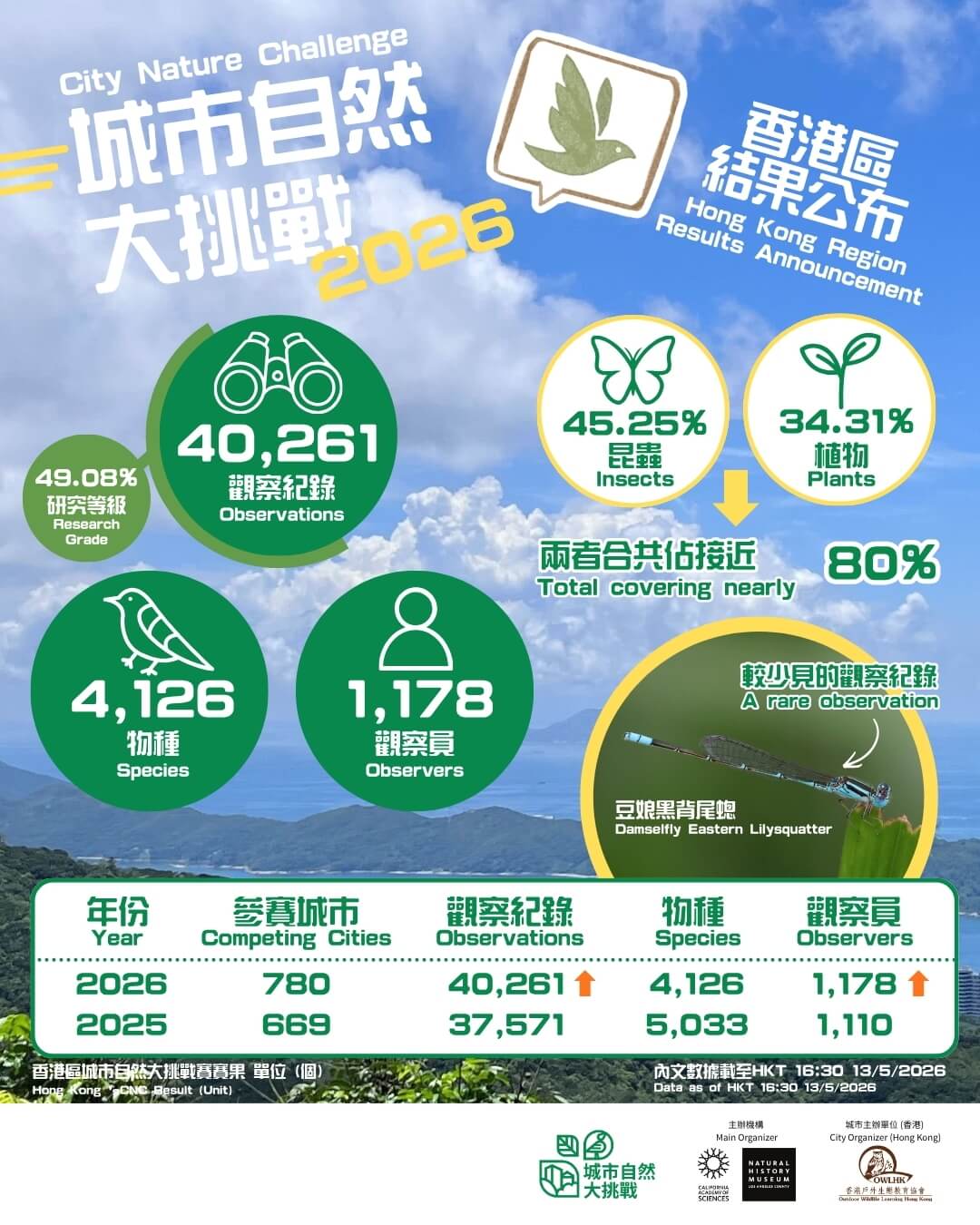
City Nature Challenge 2026 has come to an end! This four-day mega event saw enthusiastic participation from 780 cities around the world. A total of 109,683 observers contributed 2,976,286 observations, recording 83,029 species. We would like to express our heartfelt gratitude to all participating citizen scientists, providing an important reference for future conservation initiatives.
As for this year’s Hong Kong region performance, our citizen scientists remained undeterred despite the unstable weather conditions during the event. 1,178 dedicated citizen scientists submitted 40,261 observations, including 4,126 species. In particular, 49.08% of observations reached "Research Grade". "Insects" and "plants" accounted for nearly 80% of all observations, similar with last year’s data, followed by “arachnids (spiders)”, “ray-finned fishes”, “fungi”, and “birds”. During CNC, instructors and participants of our "Lantau Inter-generational Ecological Classroom – Odonata Conservation Ambassador Training Program" spotted an Eastern Lilysquatter (Paracercion melanotum) in Wang Tong, Mui Wo. Prior to this year's CNC, only two iNaturalist observations were recorded on Lantau Island. Such a rare sighting! CNC encouraged people to observe local wildlife, especially often-overlooked small creatures, which was a valuable contribution to the ecological database.
Through this event, we hope that everyone could cultivate the habit of using iNaturalist to record biodiversity. All urban dwellers were cordially invited to activate their "nature radar", observe local animals and plants in detail, and exchange ecological knowledge with fellow nature enthusiasts. By contributing to the ecological database, we could facilitate scientific research and development. We look forward to all citizen scientists’ participation for next year's City Nature Challenge. Let’s contribute to the global ecological database together!
*Data as of HKT 16:30 , 13/5/2026
Enquiry

City Organizer (Hong Kong)
Outdoor Wildlife Learning Hong Kong
All parties are welcome to host events in response to CNCHK!
If you need assistance, please contact us for inquiries or promotion.
FAQ
1. When is City Nature Challenge 2026?
- Photo-taking Dates: April 24 – April 27
- Uploading and ID Period: April 28 – May 10
- Results announced: May 13
2. When can I start making observations that will count for the CNC? When should I stop?
All observations made starting on April 24 at 00:00 HKT and up until April 27 at 23:59 HKT will count for the City Nature Challenge 2026.
3. Can I upload photos during the CNC that I took prior to the CNC?
No, only observations made during April 24 – April 27 2026 will count for the City Nature Challenge.
4. I took so many photos during the CNC that there's no way I can get them all uploaded before the end day on April 28 - what should I do?
Relax! We have two weeks – up until May 10, where you can work on uploading the observations. They’ll still get added to CNCHK project, as long as they were made in the April 24 – April 27 window.
5. Do I need to join CNCHK's project and add my observation to it for them to be included?
No. All observations that are made within the boundary of the project between April 24 – April 27 2026 will automatically get pulled into the project – YOU DO NOT NEED TO ADD YOUR OBSERVATIONS TO THE PROJECT. You’re welcome to join the project though — that way you’ll get notifications about New posts, and you can check if your individual observation is included in the project directly in the page of that observation.
6. How can I make sure my observations are in CNCHK's project?
The easiest way is to go to CNCHK’s project, click the “Observers” tab, and look for your name! If you’ve joined CNCHK’s project, you can also look at your individual observations and you’ll see your city’s project listed under the “Projects” sidebar.
7. What kind of observations should I make during the CNCHK?
Any observations of WILD plants, animals, fungi, seaweed, bacteria, lichen, etc. you find in and around your city! Observations of living or dead organisms, or evidence of those organisms, like shells, tracks, scat, feathers, etc., are fine. Remember to make sure you’re taking good photos that aid identification of your observation!
8. What if I make an observation of something I know isn't wild? Will it still count for the CNCHK?
Observations of non-wild organisms WILL NOT COUNT for the CNCHK. Therefore, it’s VERY IMPORTANT TO MARK THOSE OBSERVATIONS AS CAPTIVE/CULTIVATED.
Please ensure your contributions to the City Nature Challenge helps research for years to come by marking any observation that you know for sure is not wild as captive/cultivated – in iNaturalist, there’s a field for it when you upload an observation. This includes pets, animals in a zoo/aquarium, plants in your garden, potted plants, plants at a botanical garden, etc. Here’s a very short video on how to mark observations as captive/cultivated.
9. How are my observations identified if I don't know what organism I took a picture of?
No worries! You don’t have to know what species you have photographed – you only need to take photos of sufficient quality so that it can be identified (please refer to FAQ Question 13 for tips on how to take good photos). There are a couple ways you can get your observations IDed: iNaturalist has Computer Vision/Artificial Intelligence (AI) built into it, and when you use the app to make an observation or upload one on the web, and you have an internet connection, iNaturalist will provide you with species identification suggestions. You can choose one of these suggestions, especially if it says “Visually Similar” AND “Seen Nearby”, as this function is built upon the foundation of observations already made by others. If none of the AI suggestions look correct, you can type in your own identification using the search bar. (e.g. “Wild Coffee” or “Plants” are both fine to use as an ID!)
Once you upload an observation, it can be seen by the entire iNaturalist community. The community can agree with the ID you made, help refine an ID to get it to species level, or correct a mis-identification. Please remember that you need to take good-quality photos so that other people can help identify your observation record! It’s important to remember that all identifications on iNaturalist are suggested by other users who voluntarily delicate their time; iNaturalist does not employ staff responsible for identifications.
10. Do I have to make observation using the app? What if I want to use a digital camera?
For iNaturalist, while it’s convenient to use the app for making observations, it’s also fine to use a digital camera. You can upload your observations using the Upload tool on iNaturalist, and if your camera doesn’t have a GPS, you can place a pin to indicate the location of your observation. If you’re planning on making most of your CNC observations using a camera, we recommend watching this short video on how to use iNaturalist’s Photo Uploader.
11. What if I see something but didn't take a photo - can I still make an observation?
Observations without evidence (photo/sound) are graded as casual records, since no one can help ID or confirm an observation without a photo. CASUAL RECORDS WILL NOT COUNT for the CNCHK.
We understand that sometimes birds or butterflies fly past and you just can’t get photograph them. You can still make observations in iNaturalist without a photo (please do this sparingly, and only if you are certain what the species is). However, these will not count for the CNCHK.
12. Can I use the Seek app to make observations?
Seek by iNaturalist is a great way to engage children and families in nature exploration because it does not automatically collect authentication information from users. In order to use Seek to make observations for the CNC, you must first login to Seek using your iNaturalist account.
13. Tips for taking photos for the CNCHK
The photos you take during the CNCHK serve as evidence of the organism you saw and help confirm the identification of it. Therefore, taking good-quality photos is key to participating! Here are some tips for taking photos:
- Focus on one species in each photo
While a meadow full of wild flowers is beautiful, it’s not the best photo for an observation record, as there are probably many species represented in that shot! Whenever possible, try to have the one species you are interested in the focus of the photo, get close to the organism and place it in the center of the frame. - Take multiple photos when observing
On iNaturalist, you can upload multiple photos for each observation record, allowing you to show different parts or angles of the species. For example, a photo of an entire tree, taken from afar is not very useful in identifying the species of the tree. However, the “full shot” photo with close-ups of the leaves, bark, and any flowers or fruits will be much more effective in helping to identify that tree. - Avoid blurry photo
Be sure to utilize the “Retake” option to ensure the observation record photo is clear! If the photo is blurry due to movement or low light, wait for the organism to be still or turn on the flash, and retake the picture. The iNaturalist app will show you the photo you just took and ask if you want to retake it or agree to use it. - Get closer
For small organisms in particular, like ants, getting a nice close-up shot is important for identification. While it can be difficult to take a good close-up shot using the smartphone’s built-in camera, there are now some inexpensive clip-on macro lenses you can use with your phone to take close-up photos of the organisms’ intricate features, such as tiny flowers of a plant or the eyes of a spider.
14. Someone added an ID to my observation - should I agree with it? What if I disagree?
If you are confident in distinguishing between similar species, you can provide identification suggestions.
However, please do not simply “Agree” with identifications suggested by other users if you are not sure how to identify a particular taxon. Agreeing to a species ID without proper knowledge may cause the record to reach Research Grade erroneously.
If you disagree with an identification, the best thing to do is to add your own identification and explain your reasoning in the comment. If you added an identification before another user made their suggestion, you can also leave a comment to explain your reasoning and justify your ID.
15. How do observations in iNaturalist become Research Grade? Do my observation have to get to Research Grade to count for the CNCHK?
To reach “Research Grade”, an observation record:
- Must have a photo.
- Must have an accurate date and location.
- Cannot be a captive or cultivated individual.
- Must have over two-thirds of the users who have added IDs agreeing on the same identification.
It’s key to check your observations after uploading to see if someone has added an identification or left a comment, as they might ask you for more information about the record.
Even non-Research Grade observations will be counted for the CNCHK. Only Casual Records (i.e. observations without evidence or of non-wild organisms) will not be counted.
16. Can I help identify others’ observations during the CNCHK?
Yes! In the same way that anyone can be an observer, anyone can help identify observations.
In iNaturalist, go to CNCHK’s project, click “Observations” and you’ll see an “Identify” button pop up just below it. Clicking this will take you to the iNaturalist Identify page and show you all of CNCHK’s observations that need to be identified. On this page, use the “Filters” function to limit the displayed taxa and help identify the species you are familiar with.
Even if you’re not an expert in any field, you can still help identify the “unknowns” – observations with no IDs at all! Click the “Filters” button and select the dashed leaf with a question mark in it: This will show you all the observations that are currently marked as “unknown.” Browse through these entries and add identification suggestions (such as “plants” or “insects” or “birds” or “fungi”) to help users familiar with those categories find records that need identification! Here’s a short video about using the Identify page.
In any case, please only add an ID that you are certain about. It is fine if you are not confident, you can simply add an ID at the genus, family, or even kingdom level.